Executors是一个工厂类,提供了创建几种预配置线程池实例地方法,如果不需要应用任何自定义地微调,可以调用这些方法创建默认配置地线程池。Executors工厂类提供地线程池有以下几种: 1)newCachedThreadPool(): 创建一个可缓存地线程池,这个线程池地线程数量可以根据需要自动扩展,如果有可用的空闲线程,就会重用它们;如果没有可用的线程,就会创建一个新线程,适用于执行大量的短期异步任务。 2)newFixedThreadPool(int nThreads): 创建一个固定大小的线程池,其中包含指定数量的线程,线程数量是固定的,不会自动扩展,适用于执行固定数量的长期任务。 3)newSingleThreadExecutor(): 创建一个单线程的线程池,用于串行执行任务。适用于需要按顺序执行任务的场景。 4)newScheduledThreadPool(int corePoolSize): 创建一个单线程的定时执行线程池。只包含一个线程,用于串行定时执行任务。 5)newWorkStealingPool(int parallelism): 创建一个工作窃取线程池,线程数量根据CPU核心数动态调整,适用于CPU密集型的任务。
ExecutorService ExecutorService是java.util.concurrent包的重要组成部分,是Java JDK提供的框架,用于简化异步模式下任务的执行。一般来说,ExecutorService会自动提供一个线程池和相关API,用于为其分配任务。
工厂方法实例化ExecutorService Executors类提供了许多工厂方法用于实例化ExecutorService,最常用的是newFixedThreadPool方法,用于创建指定线程数的ExecutorService实例,使用方法如下所示:
1 ExecutorService executor = Executors.newFixedThreadPool(10);
直接创建ExecutorService实例 ExecutorService是一个接口,因此可以使用其任何实现类的实例,例如ThreadPoolExecutor类实现了ExecutorService接口并提供了一些构造函数用于配置执行程序服务及其内部池。
1 2 3 4 5 6 7 8 int core = Runtime.getRuntime().availableProcessors(); int max = Runtime.getRuntime().availableProcessors() * 2 + 1; int wait = 60; int capacity = 500; ThreadPoolExecutor threadPoolExecutor = new ThreadPoolExecutor(core, max, wait, TimeUnit.SECONDS, new LinkedBlockingQueue<> (capacity), Executors.defaultThreadFactory(), new ThreadPoolExecutor.CallerRunsPolicy());
这里的参数,从左到右分别表示: 1)corePoolSize:核心线程数 2)maxPoolSize:最大线程数 3)keepAliveTime:额外的线程(即实例化超过corePoolSize的线程)在空闲状态下的存活时间。 4)unit:等待时间单位 5)workQueue:任务队列 6)threadFactory:线程工厂 7)handler:拒绝策略 其中,拒绝策略主要有以下几种: 1)AbortPolicy:直接抛出RejectedExecutionException异常阻止系统正常运行。 2)CallerRunsPolicy:既不抛弃任务,也不抛出异常,而是将某些任务回退给调用者,从而降低任务的流量。 3)DiscardOldestPolicy:抛出等待队列中最先等待的任务,然后把当前任务加入队列中。 4)DiscardPolicy:既不处理也不抛出异常,如果允许任务丢弃,这是最好的方法。
任务分配给ExecutorService ExecutorService可以执行Runnable和Callable任务,首先我们创建两个原始任务类:
1 2 3 4 5 6 7 8 9 10 11 12 13 14 15 16 17 18 19 20 21 22 23 24 private static List<Callable<String > > buildCallableTasks() { Callable<String > callableTask = () -> { TimeUnit.MILLISECONDS.sleep(300); System.out.println("buildCallable=========="); return "Task's execution"; }; List<Callable<String > > callableTasks = new ArrayList<> (); callableTasks.add(callableTask); callableTasks.add(callableTask); callableTasks.add(callableTask); return callableTasks; } private static Runnable buildRunnable() { return () -> { try { TimeUnit.MILLISECONDS.sleep(300); System.out.println("buildRunnable==========="); } catch (InterruptedException e) { e.printStackTrace(); } }; }
创建完任务之后,可以使用多种方法将任务分配给ExecutorService.
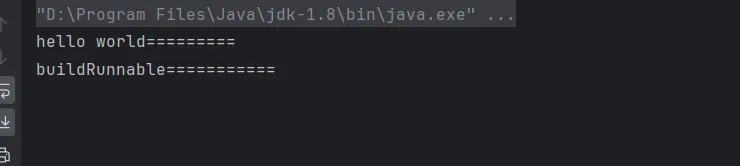
execute 改方法返回值为空(void),因此改方法没有任何可能获得任务执行结果或检查任务的状态。使用示例如下:
1 2 3 4 5 6 private static void testExecute() { ExecutorService executorService = Executors.newFixedThreadPool(2); Runnable runnable = buildRunnable(); executorService.execute(runnable); System.out.println("hello world========="); }
在main方法中调用该方法,结果如下:
submit submit方法会将一个Callable或Runnable任务提交给ExecutorService并返回future类型的结果。
1 2 3 4 5 6 7 8 9 10 11 12 13 14 private static void testSubmit() throws ExecutionException, InterruptedException { ExecutorService executorService = Executors.newFixedThreadPool(2); Runnable runnable = buildRunnable(); List<Callable<String > > callableTasks = buildCallableTasks(); Future<?> runnableFuture = executorService.submit(runnable); List<Future<String > > callableFutures = new ArrayList<> (); for (Callable<String > callableTask : callableTasks) { callableFutures.add(executorService.submit(callableTask)); } System.out.println(runnableFuture.get()); for (Future<String > callableFuture : callableFutures) { System.out.println(callableFuture.get()); } }
通过future类的get方法,能获取返回的结果,如果提交的是一个Runnable任务,那么通过future的get方法,返回的是一个null,如下图所示:
invokeAny invokeAny方法将一组任务分配给ExecutorService,使每个任务执行,并返回任意一个成功执行的任务结果。
1 2 3 4 5 6 private static void testInvokeAny() throws ExecutionException, InterruptedException { ExecutorService executorService = Executors.newFixedThreadPool(2); List<Callable<String > > callableTasks = buildCallableTasks(); String result = executorService.invokeAny(callableTasks); System.out.println(result); }
结果如下所示:
invokeAll invokeAll方法将一组任务分配给ExecutorService,使每个任务执行,并以Future类型的对象列表形式返回所有任务执行的结果。
1 2 3 4 5 6 7 8 private static void testInvokeAll() throws InterruptedException, ExecutionException { ExecutorService executorService = Executors.newFixedThreadPool(2); List<Callable<String > > callableTasks = buildCallableTasks(); List<Future<String > > futures = executorService.invokeAll(callableTasks); for (Future<String > future : futures) { System.out.println(future.get()); } }
结果如下:
关闭ExecutorService 一般情况下,ExecutorService并不会自动关闭,即使所有任务都执行完毕,或者没有要处理的任务,也不会自动销毁ExecutorService,会一直处于等待状态,等待我们给他分配新的工作。当应用程序需要处理不定期出现的任务时,这种机制很有用,但是也带来一些副作用:即使应用程序到达它的终点,也不会被停止,因为等待ExecutorService将导致JVM继续运行,这样,我们就需要主动关闭Executor Service。 要关闭ExecutorService,可以使用shutdown方法或shutdownNow方法
shutdown shutdown方法并保护会立即销毁ExecutorService实例,而是首先让ExecutorService停止接受新任务,并且在所有正在运行的线程完成当前工作后关闭。
shutdownNow shutdownNow() 方法会尝试立即销毁 ExecutorService 实例,所以并不能保证所有正在运行的线程将同时停止。该方法会返回等待处理的任务列表,由开发人员自行决定如何处理这些任务。 因为提供了两个方法,因此关闭 ExecutorService 实例的最佳实战 ( 也是 Oracle 所推荐的 )就是同时使用这两种方法并结合 awaitTermination() 方法。 使用这种方式,ExecutorService 首先停止执行新任务,等待指定的时间段完成所有任务。如果该时间到期,则立即停止执行。
1 2 3 4 5 6 7 8 9 10 11 12 13 14 15 16 private static void testInvokeAll() throws InterruptedException, ExecutionException { ExecutorService executorService = Executors.newFixedThreadPool(2); List<Callable<String > > callableTasks = buildCallableTasks(); List<Future<String > > futures = executorService.invokeAll(callableTasks); for (Future<String > future : futures) { System.out.println(future.get()); } executorService.shutdown(); try { if (!executorService.awaitTermination(800, TimeUnit.MILLISECONDS)) { executorService.shutdownNow(); } } catch (InterruptedException e) { executorService.shutdownNow(); } }
Future接口 在ExecutorService的submit方法、invokeAll方法,都会返回一个Future对象或Future对象集合,这些Future接口的对象允许我们获取任务执行的结果或检查任务状态(运行中还是执行完毕)
get方法 future接口提供一个特殊的阻塞方法get,它返回callable任务执行的实际结果,但如果是runnable任务,只会返回null。此外,正在执行的任务随时可能抛出异常或中断执行,因此我们要将get调用放在try catch语句块中,以捕获InterruptedException或ExecutionException异常。
1 2 3 4 5 6 7 8 9 10 11 12 13 14 15 16 17 18 19 20 21 22 23 24 private static void testFutureGet() { ExecutorService executorService = Executors.newFixedThreadPool(2); Callable<String > callable = () -> { System.out.println("执行callable任务"); TimeUnit.MILLISECONDS.sleep(300); return "callable执行完毕"; }; Future<String > future = executorService.submit(callable); try { String result = future.get(); System.out.println(result); } catch (InterruptedException | ExecutionException e) { e.printStackTrace(); } executorService.shutdown(); try { if (!executorService.awaitTermination(800, TimeUnit.MILLISECONDS)) { executorService.shutdownNow(); } } catch (InterruptedException e) { executorService.shutdownNow(); } }
因为get方法是阻塞的,并且不知道要阻塞多长时间,因此可能导致应用程序的性能降低,如果结果数据并不重要,我们可以使用超时机制来避免长时间阻塞,也就是使用get的重载方法,第一个参数为超时时间,第二个参数为时间的单位。如果在超时时间内正常结束,那么返回Future的结果,如果超时了还没结束,那么将抛出TimeoutExeception异常。
1 2 3 4 5 6 7 8 9 10 11 12 13 14 15 16 17 18 19 20 21 22 23 24 25 26 27 28 29 30 31 32 33 34 35 36 private static void testFutureGet() { ExecutorService executorService = Executors.newFixedThreadPool(2); Callable<String > callable = () -> { System.out.println("执行callable任务"); TimeUnit.MILLISECONDS.sleep(300); return "callable执行完毕"; }; Future<String > future = executorService.submit(callable); try { String result = future.get(400, TimeUnit.MILLISECONDS); System.out.println(result); } catch (InterruptedException | ExecutionException | TimeoutException e) { e.printStackTrace(); } Callable<String > callable2 = () -> { System.out.println("执行callable任务"); TimeUnit.MILLISECONDS.sleep(500); return "callable执行完毕"; }; Future<String > future2 = executorService.submit(callable2); try { String result = future2.get(400, TimeUnit.MILLISECONDS); System.out.println(result); } catch (InterruptedException | ExecutionException | TimeoutException e) { e.printStackTrace(); } executorService.shutdown(); try { if (!executorService.awaitTermination(800, TimeUnit.MILLISECONDS)) { executorService.shutdownNow(); } } catch (InterruptedException e) { executorService.shutdownNow(); } }
执行结果如下,第一个任务没有超时,所以能正常获取结果,第二个任务超时,所以会抛出异常。
其他方法 除了get方法外,Future还提供许多方法,主要的方法如下: 1)isDone: 检查已分配的任务是否已处理 2)cancel: 取消任务执行 3)isCancelled:检查任务是否已取消
ScheduledExecutorService接口 ScheduledExecutorService接口用于在一些预定义的延迟之后运行任务或定期运行任务。我们可以通过Executors类的工厂方法实例化ScheduledExecutorService,如下:
1 ScheduledExecutorService scheduledExecutorService = Executors.newSingleThreadScheduledExecutor();
在ScheduledExecutorService接口中,有三个主要方法: 1)schedule:允许在指定的延迟后执行一次任务。 2)scheduleAtFixedRate:允许在指定的初始延迟后执行任务,然后以一定的周期重复执行,其中period参数用于指定两个任务的开始时间之间的间隔时间,因此任务执行的频率是固定的。 3)scheduleWithFixedDelay:类似于scheduleAtFixedRate,它也重复执行给定的任务,单period参数用于指定前一个任务的结束和下一个任务的开始之间的间隔时间,也就是指定下一个任务延时多久后才执行,执行频率可能会有所不同,具体取决于执行任务给定任务所需的时间。
scheduled方法 假设要在固定延迟后安排某个任务的执行,可以使用ScheduledExecutorService实例的scheduled方法:
1 2 3 4 5 6 7 8 9 10 11 12 13 14 15 16 17 18 19 20 21 22 23 private static void testScheduled() { ScheduledExecutorService scheduledExecutorService = Executors.newSingleThreadScheduledExecutor(); Callable<String > callable = () -> { System.out.println("执行callable任务===="); return "callable"; }; ScheduledFuture<String > schedule = scheduledExecutorService.schedule(callable, 1, TimeUnit.SECONDS); System.out.println("主线程运行中========"); try { System.out.println(schedule.get()); } catch (InterruptedException | ExecutionException e) { e.printStackTrace(); } scheduledExecutorService.shutdown(); try { if (!scheduledExecutorService.awaitTermination(800, TimeUnit.MILLISECONDS)) { scheduledExecutorService.shutdownNow(); } } catch (InterruptedException e) { scheduledExecutorService.shutdownNow(); } }
结果如下,在延迟一秒后,才开始执行线程任务:
scheduleAtFixedRate方法 当我们需要在固定延迟后,定期执行任务时,可以使用scheduleAtFixedRate方法,如下所示,每隔500毫秒执行相同的任务:
1 2 3 4 5 6 7 8 9 private static void testScheduleAtFixRate() { ScheduledExecutorService scheduledExecutorService = Executors.newSingleThreadScheduledExecutor(); Runnable runnable = () -> { System.out.println(System.currentTimeMillis()); System.out.println("执行callable任务===="); }; // 延迟1秒后,每间隔2秒执行一次 scheduledExecutorService.scheduleAtFixedRate(runnable, 1, 2, TimeUnit.SECONDS); }
结果如下所示,从时间戳我们可以看出,确实是每隔2秒执行一次
如果任务执行时间比间隔时间长,那么scheduledExecutorService将等到当前任务执行后再开始下一个任务
1 2 3 4 5 6 7 8 9 10 11 12 13 14 private static void testScheduleAtFixRate() { ScheduledExecutorService scheduledExecutorService = Executors.newSingleThreadScheduledExecutor(); Runnable runnable = () -> { System.out.println(System.currentTimeMillis()); try { TimeUnit.SECONDS.sleep(3); } catch (InterruptedException e) { throw new RuntimeException(e); } System.out.println("执行callable任务===="); }; // 延迟1秒后,每间隔2秒执行一次 scheduledExecutorService.scheduleAtFixedRate(runnable, 1, 2, TimeUnit.SECONDS); }
如下所示,我们执行任务需要3秒,而间隔时间是2秒,通过打印结果可以看出,任务之间间隔3秒,也就是会等待任务执行完成后才开始下一个任务:
scheduleWithFixedDelay方法 如果任务之间必须具有固定长度的延迟,那么可以使用scheduleWithFixedDelay方法。
1 2 3 4 5 6 7 8 9 10 11 12 13 14 15 private static void testScheduleWithFixDelay() { ScheduledExecutorService scheduledExecutorService = Executors.newSingleThreadScheduledExecutor(); Runnable runnable = () -> { System.out.println(System.currentTimeMillis()); try { TimeUnit.SECONDS.sleep(3); } catch (InterruptedException e) { throw new RuntimeException(e); } System.out.println("执行callable任务===="); }; // 延迟1秒后,每间隔2秒执行一次 scheduledExecutorService.scheduleWithFixedDelay(runnable, 1, 2, TimeUnit.SECONDS); }
在上述代码中,任务执行时长需要3秒,然后我们设置延迟时间为2秒,最终执行结果如下,从时间戳中可以看出,在上一个任务执行完毕后,间隔2秒才会开始下一个任务,因此任务与任务间隔时长为5秒。
参考文章 https://blog.csdn.net/qq_21484461/article/details/133101696